> For the complete documentation index, see [llms.txt](https://help.safebooks.vn/safebooks/llms.txt). Markdown versions of documentation pages are available by appending `.md` to page URLs; this page is available as [Markdown](https://help.safebooks.vn/safebooks/tai-san-co-dinh/bao-cao-3/bao-cao-chi-tiet-tang-giam-tai-san-co-dinh.md).
# Báo cáo chi tiết tăng/giảm tài sản cố định
Dùng để theo dõi chi tiết tình hình tăng (do mua mới, sửa chữa,...) hoặc giảm (do thanh lý, tháo dỡ phụ tùng,...) của tài sản theo từng kỳ.
## Các bước thực hiện
**Bước 1:** Vào đường dẫn ***Tài sản/ Báo cáo/ Tăng, giảm TSCĐ/ Báo cáo chi tiết tăng,giảm TSCĐ***
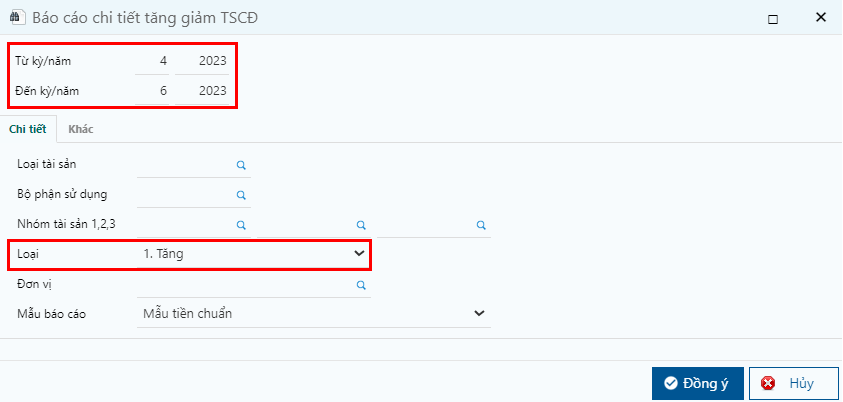
**Bước 2:** Nhập thông tin lọc và nhấn **Đồng ý**
Nhập điều kiện lọc
**Các thông tin cần lưu ý:**
* Từ kỳ/năm đến kỳ/năm: lọc theo thời gian ghi nhận tăng tài sản.
* Chọn loại Tăng/Giảm: báo cáo thể hiện theo mã loại chọn trên khai báo điều chỉnh giá trị tài sản
.png?alt=media)
.png?alt=media)