> For the complete documentation index, see [llms.txt](https://help.safebooks.vn/safebooks/llms.txt). Markdown versions of documentation pages are available by appending `.md` to page URLs; this page is available as [Markdown](https://help.safebooks.vn/safebooks/ban-hang/thanh-toan/thu-tien-ban-hang-khach-hang-no.md).
# Thu tiền bán hàng khách hàng nợ
## Mô tả nghiệp vụ
Sau khi bán hàng và ghi nhận công nợ, kế toán thu tiền và ghi giảm công nợ cho khách hàng.
## Định khoản
Nợ TK 111, 112 Tiền mặt, Tiền gửi
Có TK 131 Phải thu khách hàng
## Các bước thực hiện
Người dùng có thể lựa chọn một trong hai cách sau để thực hiện thao tác thu tiền của khách hàng.
**Cách 1. Thu tiền trực tiếp cho hoá đơn bán**
Xem thao tác thu tiền của khách hàng tại [link](/safebooks/tien-mat/thu-tien/thu-tien-theo-hoa-don.md) (nếu thu tiền mặt) và [link](/safebooks/tien-g-i-ngan-hang/thu-tien/thu-tien-theo-hoa-don-cua-nhieu-khach-hang-bang-tien-gui-ngan-hang.md) (nếu thu tiền gửi).
**Cách 2. Thu tiền trực tiếp theo đối tượng (khách hàng)**
**Bước 1**: Tạo phiếu thu (hoặc giấy báo có) loại 2. Thu theo đối tượng
Xem thao tác thu tiền trực tiếp theo đối tượng tại [link](/safebooks/tien-mat/thu-tien/thu-tien-theo-doi-tuong-va-nhieu-doi-tuong-bang-tien-mat.md) (nếu thu tiền mặt) hoặc tiền gửi tại [link ](/safebooks/tien-g-i-ngan-hang/thu-tien/thu-tien-theo-doi-tuong-khach-hang-bang-tien-gui-ngan-hang.md)(nếu thu tiền gửi).
**Bước 2**: Phân bổ phiếu thu tiền cho các hoá đơn bán
Xem hướng dẫn thao tác phân bổ thu tiền cho hoá đơn [tại đây](/safebooks/ban-hang/quan-ly-tuoi-no-hoa-don/phan-bo-tien-thu-cho-hoa-don.md).
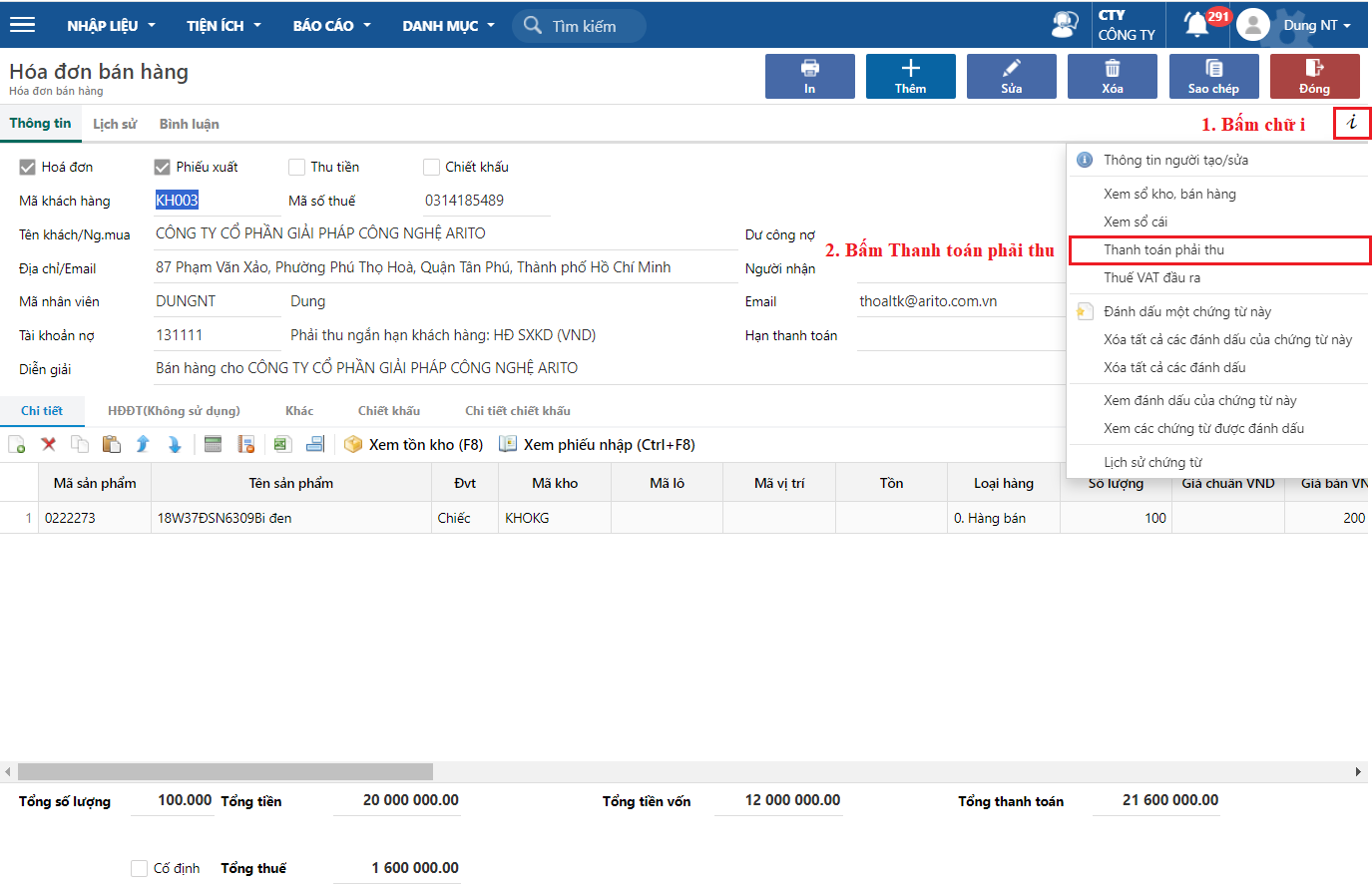
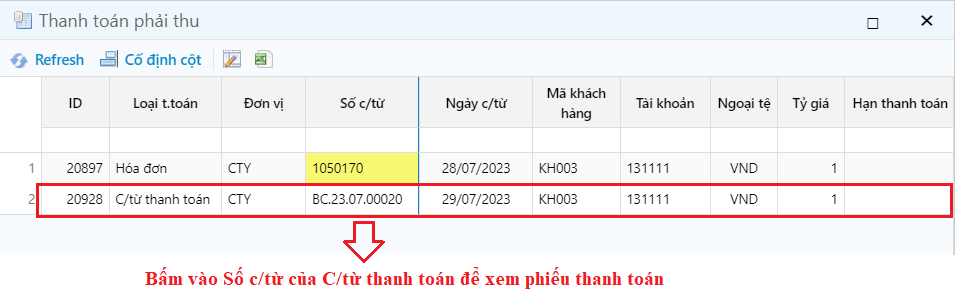
**Bước 3**: Xem thông tin thanh toán của hoá đơn bán
Đường dẫn: ***Bán hàng/ Nhập liệu/ Hóa đơn bán ra/ Hoá đơn bán hàng (Hoá đơn bán dịch vụ)***